4.0.0

Challenge alarm + complete sleep-to-wake routine

Sleep well. Wake up for real.

Settle into the night with customizable audio. In the morning, end the alarm with an action you chose, then move into weather, news and sleep context, all in one private iPhone routine.

Version 4.0.0 is now available. No account. No ads. No developer tracking.

New in 4.0.0Continuous Walk, offline listening and clearer widgets
Made for iPhoneA focused, Apple-native experience
Apple Watch + HealthOptional context when available
Privacy by designPersonal app data stays off developer servers

New in version 4.0.0

More useful at night. Harder to dismiss in the morning. More dependable every day.

This release expands the parts users feel directly and strengthens the alarm foundations behind them.

Walk until you are awake

Continuous Walk uses real steps, adding movement when a tap is not enough.

Listen without a connection

Download supported podcasts, Books, Originals, ASMR and Guided Sleep for offline playback with Premium.

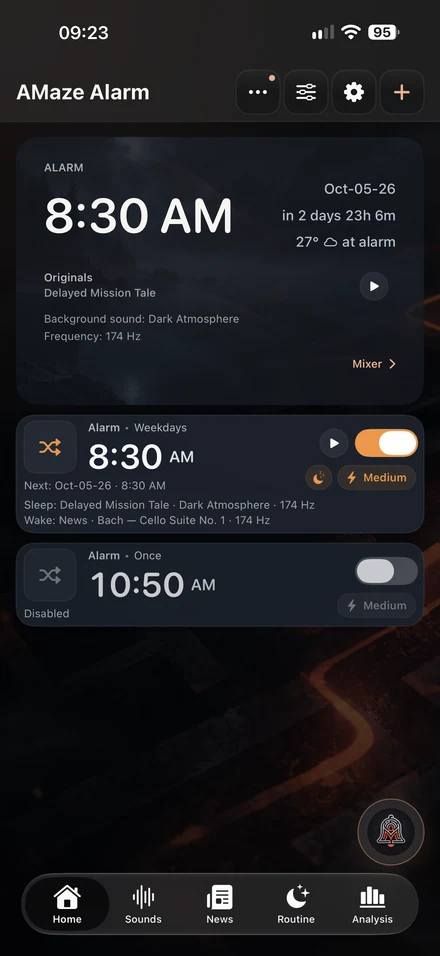
See the next alarm faster

Redesigned widgets make the next alarm, countdown and weather easier to read at a glance.

Shape the sound around you

Use Sound Peak Protection, Playback speed and the Mixer to make spoken audio and ambience more comfortable.

Make AMaze feel personal

Enjoy the refined Mint theme, a new Mint wallpaper and the Premium Moon app icon.

Go to bed with more confidence

Alarm Health checks readiness, while Clear cache removes temporary files without deleting alarms, settings, downloads or progress.

One connected flow

One routine, from the evening wind-down to the first minutes of your morning

AMaze Alarm connects moments that are usually split across an alarm clock, a sound app and a sleep tracker.

01

Prepare the night

Use Sleep Routine, reminders and Sleep Sounds to turn bedtime and the next alarm into one plan.

Sleep Routine screen
02

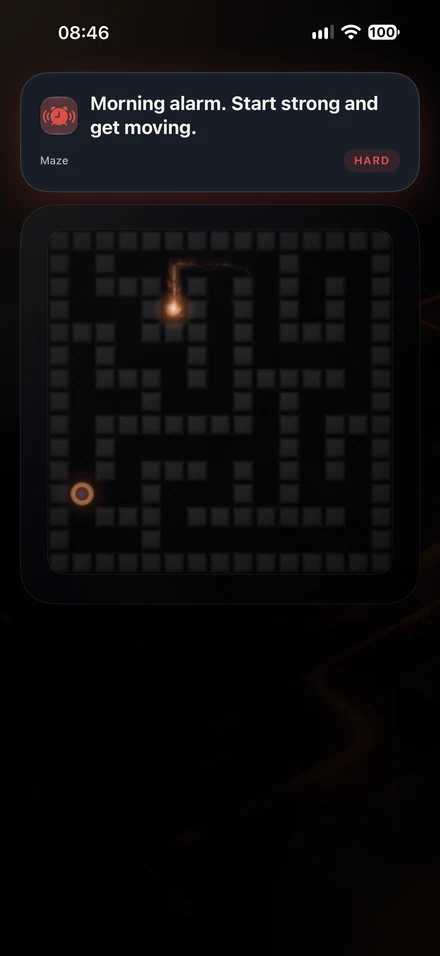
Wake with a real action

Choose Continuous Walk, a maze, math, light, taps or another challenge that matches the effort you need.

Choose challenge screen
03

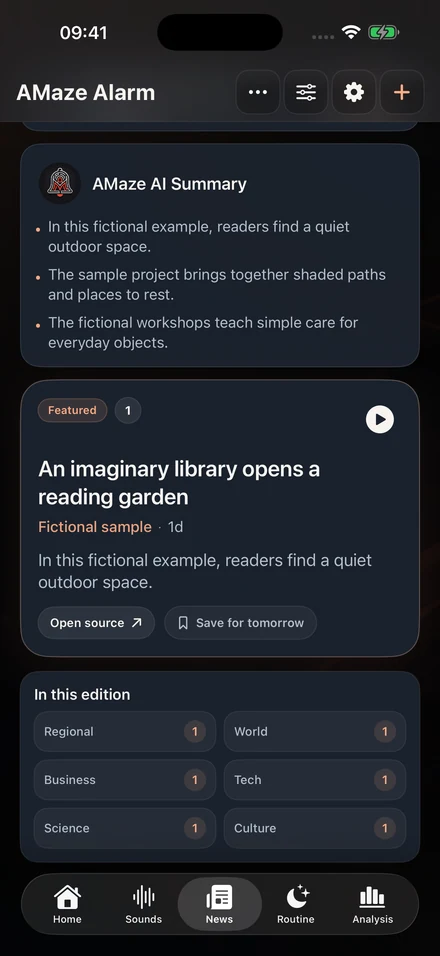
Start with context

Move from the alarm into weather, News, your next alarm, Sleep Insights, Sleep debt and Daily Energy Forecast when available.

Morning weather and news screen

See the core wake-up flow

The alarm ends when you complete the action you chose

Set the alarm, choose a challenge and difficulty, then move from dismissal into your morning context.

  • Challenge difficulty and snooze rules
  • Wake-up sounds and morning content
  • Wake-up check for a later confirmation
Core-flow recording from the previous interface. The workflow remains available in 4.0.0, with refined screens and reliability.

Choose the effort

More friction when you need it, less when you do not

Each alarm can match a different morning. Use No Challenge for a standard alarm, pick one challenge, or let Random Mode and Sequential Mode vary the wake-up flow.

  • Continuous Walk, Maze, Fog Maze and Tilt Maze
  • Math Challenge and Synonym Challenge
  • Tap Frenzy and Random Taps
  • Lights On and No Challenge
  • Random Mode and Sequential Mode
Explore the complete alarm flow →
More friction when you need it, less when you do not
Choose the effort
More friction when you need it, less when you do not

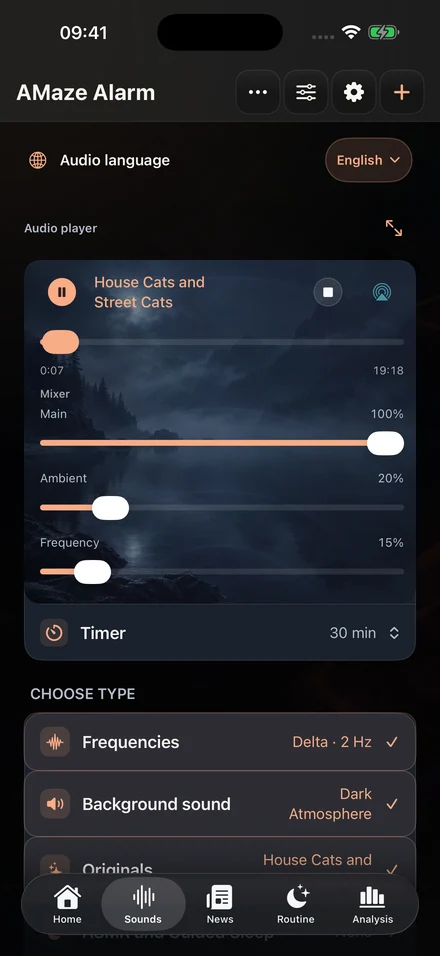
Build your sound environment

Sleep Sounds, spoken content and ambience in one setup

Choose the content you want, layer it with Background sound or Frequencies, then adjust the Mixer before sleep. Supported content can be downloaded for offline listening with Premium.

  • Originals, ASMR and Guided Sleep, Podcast and Books
  • Background sound, colored noise, classical music and Frequencies
  • Sound Peak Protection for sudden volume changes in podcasts and Books
  • Playback speed for the selected book chapter
  • Resume progress, timers and a smoother fade-out
Sleep Sounds, spoken content and ambience in one setup
Core audio-flow recording from the previous interface. Version 4.0.0 adds offline downloads and refined controls.

Context, not a diagnosis

Notice patterns without turning the morning into a medical dashboard

Sleep Insights organizes available routine and optional Apple Health context for personal awareness. It is not medical advice, diagnosis or treatment.

Sleep Insights

Sleep Insights

Review timing, regularity, alarm and routine patterns over time.

Daily Energy Forecast

Daily Energy Forecast

See a simple wellness estimate based on available sleep context.

Wake briefing

Wake briefing

Open weather and News after the alarm when those options are enabled.

Private by design

Your alarms, sleep context and choices stay off developer servers

AMaze Alarm requires no account and uses no ads or developer tracking. Optional permissions are used on the device or through Apple system services only for the features you enable.

Read the Privacy Policy

One app, one connected routine

How the experience differs by category

This comparison describes common product categories, not specific competitors. Features vary by app.

CapabilityStandard alarmSleep-audio appSleep trackerAMaze Alarm
Challenges to dismissUsually noNoUsually noYes
Night routineUsually noPartialPartialYes
Sleep and wake audioBasicYesPartialYes
Offline supported audioUsually noVariesUsually noYes
Morning contextUsually noUsually noPartialYes
No account requiredVariesVariesVariesYes

Current App Store version

Version 4.0.0 is the largest reliability and offline-audio update since launch

It adds Continuous Walk, supported offline downloads, refined widgets and audio controls, more personalization, Clear cache and extensive improvements across scheduling, snooze, recovery, podcasts, Books and accessibility.

  • New visible features and updated screens
  • Stronger alarm and audio foundations
  • Localized experience in English, Portuguese, Spanish and German
View the complete improvements →

Questions before downloading

Frequently asked questions

Is AMaze Alarm free?

The main alarm is free to use. Optional purchases and auto-renewable subscriptions unlock additional content and advanced features, with billing managed by Apple.

Do I need an Apple Watch?

No. The alarm, challenges, Sleep Sounds and morning experience work on iPhone. Apple Watch and Apple Health add optional context when available.

Can I use it as a normal alarm?

Yes. Choose No Challenge for a standard dismissal flow, or add a challenge only to alarms that need more friction.

Which challenges are available?

Version 4.0.0 includes Continuous Walk, Fog Maze, Lights On, Math Challenge, Maze, No Challenge, Random Taps, Synonym Challenge, Tap Frenzy and Tilt Maze, plus Random Mode and Sequential Mode.

Can I listen offline?

Premium can download supported podcasts, Books, Originals, ASMR and Guided Sleep. Availability depends on the content and provider.

What does Clear cache remove?

Clear cache removes temporary and leftover files. Covers, podcast feeds, downloads, alarms, settings and playback progress are kept.

Does the developer collect my app data?

No. The developer does not collect your alarms, Health data, location, audio choices, widgets or app-usage history.

Are location and Health permissions required?

No. They are optional and only support related features such as weather or richer sleep context. The app remains usable without them.

Can it be my only alert for a critical event?

No alarm app should be the only alert for safety-critical, medical, legal, financial or emergency situations. Keep iOS permissions and volume configured and use a backup alert when failure would have serious consequences.

Ready to connect your night and morning?

Create your first alarm, choose how much effort you need to wake up and shape the routine around your night.

Download free on the App Store